
Localhost, everywhere.
A tiny menu bar app that gives anything running on your Mac a public link. Test on your phone, show a client, catch a webhook. Flip a switch and share.
Free and open source · No account · macOS 13 or later, Apple silicon and Intel
Made for the moment
When “it works on my machine” isn’t enough.
Your dev server already runs on localhost. Localfly gives it an address the rest of the world can open, for as long as you need.
Test on a real phone
Open your site on any phone, on Wi-Fi or cellular, without deploying.
Show a client
Send a link mid-call and let them click through the real thing.
Catch webhooks
Point Stripe, GitHub or Slack at your laptop and debug as events arrive.
Hack on an API
Give a teammate or a mobile build your local API in seconds.
How it works
From localhost to link
in three steps.
No terminal, no config files, no router settings. Localfly dials out to a relay, so nothing on your network changes.
Step 1
Save your app
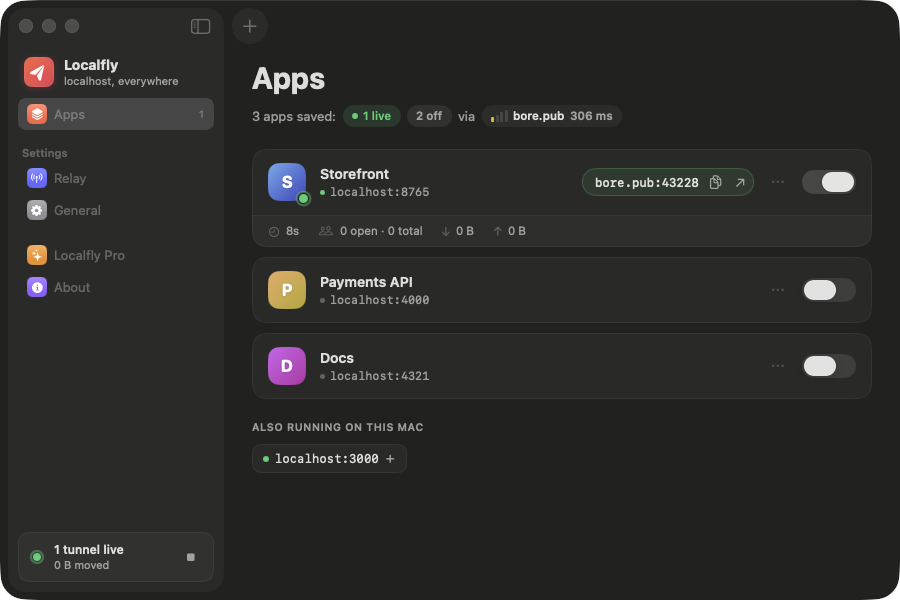
A name and a port. Running dev servers show up ready to add.
Step 2
Flip the switch
It checks something is listening, then opens a tunnel in about a second.
Step 3
Share the link
Copy it from the window or the menu bar. It opens anywhere.
Features
Small app. Careful details.
Native SwiftUI, about 2 MB, at home in light and dark mode. No account and no tracking.
Knows what’s running
A dot shows whether your dev server is up, so you never share a link to nothing. Common ports are spotted for you.
Watch traffic live
Uptime, open connections and bytes in and out for every tunnel, as it happens.
A home for every app you run
Save each project once. Turn tunnels on and off from the window or the menu bar, and close the window while they keep running.
Shrugs off Wi-Fi drops
It reconnects with backoff and asks for the same address back.
HTTPS on your domain
Point it at your own relay for padlocked addresses that never change.
Private by default
Nothing is public until you switch it on. Relay secrets stay in your keychain.
Self-host
Your relay. Your domain. Real HTTPS.
Out of the box Localfly uses the free public relay at bore.pub. For stable, padlocked addresses, run your own on a $5 server.
- bore and Caddy in one
docker compose up - Certificates fetched and renewed automatically
- A secret, so only you can open tunnels
# on your server
$ git clone https://github.com/raqibnur/localfly
$ cd localfly/deploy && cp .env.example .env
$ nano Caddyfile  # web.yourdomain.com → :40001
$ docker compose up -d
✔ relay  listening on :7835
✔ caddy  certificate for web.yourdomain.com
Pricing
Free. Actually free.
Every feature in the app costs nothing, forever. A hosted Pro version is an idea, and your interest decides whether it gets built.
- Unlimited apps and tunnels
- Free public relay at bore.pub
- Self-host with HTTPS on your domain
- Open source, MIT licensed
Like it? Buy me a coffee to keep it going.
- yourapp.localfly.dev with HTTPS, no server
- Names that never change
- Request inspector and webhook replay
- Password-protected links
Is it really free?
Yes. The app is open source under the MIT license and has no paid features. The free relay at bore.pub is run by the bore project.
Why does my bore.pub address change?
bore.pub hands out a random port each time a tunnel opens. For addresses that never change, with HTTPS, run your own relay. The self-hosting guide takes about 15 minutes.
Is it safe?
Nothing is reachable until you switch an app on, and you can switch it off instantly. While it’s on, anyone with the address can open that app, so only share what you mean to share. On bore.pub, traffic is plain http://; use your own relay for HTTPS.
Does it work with Next.js, Vite, Rails, Laravel…?
Anything that listens on a TCP port on your Mac works: web apps, APIs, webhooks, even game servers.
Which Macs are supported?
macOS 13 Ventura or later, on Apple silicon and Intel.